

Protecting BCSI on Databricks: A Practical Guide to NERC CIP-011-3
Utilities are moving operational data into the lakehouse fast. Control-room call recordings become searchable transcripts. EMS exports and network models feed planning and analytics. Switching orders and outage notes get mined for patterns. The value is real, but so is the catch: a lot of that data is BES Cyber System Information (BCSI), and NERC CIP-011-3 expects you to treat it that way wherever it lives.
This post looks at what CIP-011-3 (and its companion, CIP-004-7 Requirement R6) actually asks for, and how to meet those requirements on Databricks with Unity Catalog. We’ll stay concrete: the controls, the SQL, and the evidence you’d show an auditor.
"No platform is 'NERC CIP compliant.' Responsible Entities are. The platform's job is to make the controls enforceable and the evidence cheap."
A note before we start. There is no such thing as a NERC CIP-certified data platform. Compliance belongs to the Responsible Entity (the utility, BA, RC, TOP or GOP), and it’s judged on your documented program and the evidence that you followed it. What Databricks gives you is a set of technical controls that map cleanly onto the standard, and system tables that make the evidence easy to produce.
What CIP-011-3 requires
CIP-011-3 has a single purpose: “To prevent unauthorized access to BES Cyber System Information (BCSI)” related to High and Medium Impact BES Cyber Systems and their associated EACMS and PACS. FERC approved it in December 2021, and it took effect on January 1, 2024, alongside CIP-004-7. Version 3 was written largely to make room for BCSI stored with third parties and in the cloud.
The requirements are short:
| Requirement | What it says | What it means for a data platform |
|---|---|---|
| R1.1 | Method(s) to identify BCSI | Know which tables, columns, files and rows contain BCSI. Labels and classification are explicitly listed as acceptable evidence. |
| R1.2 | Method(s) to protect and securely handle BCSI to mitigate risks of compromising confidentiality | For off-premise BCSI, the standard names data masking, encryption, hashing, tokenization and electronic key management, plus administrative methods such as vendor risk assessments. |
| R2.1 / R2.2 | Before reuse or disposal of Cyber Assets that contain BCSI, prevent unauthorized retrieval of BCSI | Sanitize or crypto-erase storage, and keep records of it. |
CIP-004-7 R6 adds access management for BCSI. It defines access as having “both the ability to obtain and use BCSI,” and requires you to:
- R6.1: authorize provisioned access based on need, before provisioning
- R6.2: verify at least once every 15 calendar months that everyone with access still has an authorization record and still needs it
- R6.3: remove a terminated individual’s ability to use provisioned access by the end of the next calendar day
Evidence for both standards must be kept for three calendar years.
Why call recordings and transcripts are in scope
It’s easy to think of BCSI as diagrams and firewall rule sets. But control-room conversations regularly contain the same information said out loud: device names and locations, relay settings, network addresses, remote access procedures and, on bad days, credentials read over the phone. Once those calls are transcribed, the BCSI that used to sit in an audio file nobody listened to is now searchable text.
That’s exactly the scenario our Dispatch Call Analytics solution deals with, and it shapes the design below. BCSI isn’t confined to a few well-known tables. It turns up in individual sentences inside otherwise ordinary data, so your controls need to work at the row and column level, not just the database level.
The architecture at a glance
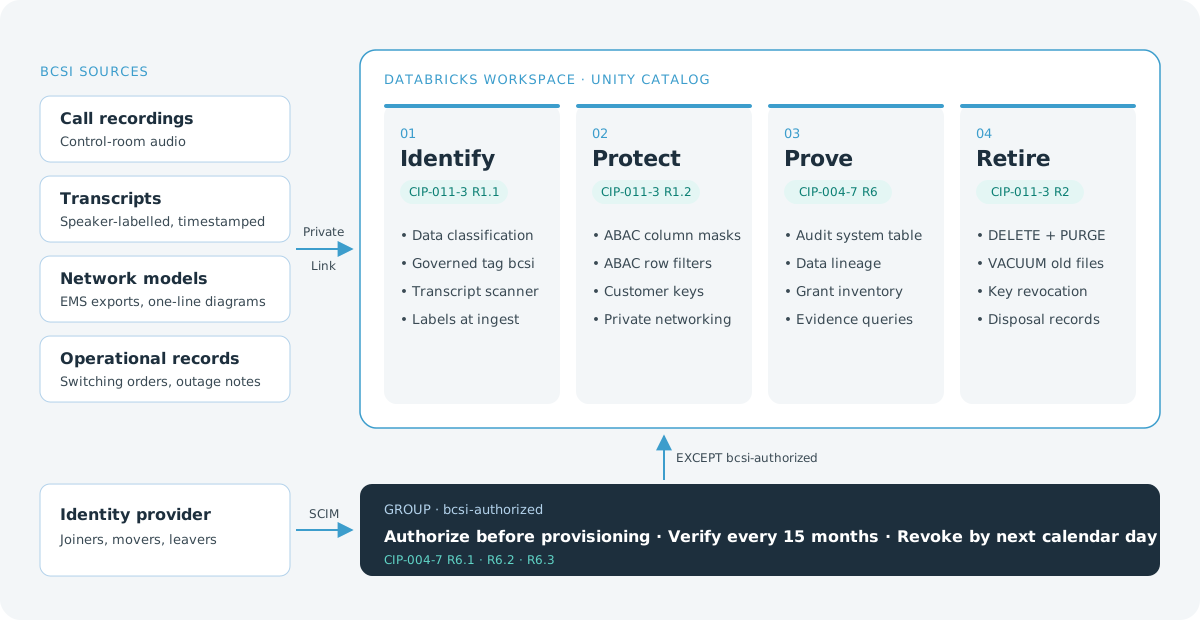
Four stages, each tied to a requirement, with one identity group deciding who can see unmasked BCSI.
The design follows four stages, each tied to a requirement. One identity group, bcsi-authorized, managed in your identity provider, is the single source of truth for who may obtain and use BCSI.
1. Identify: classify and tag BCSI (CIP-011-3 R1.1)
R1.1 lists “indications on information (e.g., labels or classification)” and “storage locations identified for housing BCSI” as acceptable evidence. Unity Catalog gives you both.
Storage locations. Put BCSI in its own catalog or schema (for example, grid_ops.bcsi) so the storage location itself is a documented identification method. Store raw call audio in a Unity Catalog volume in that schema, so file access goes through the same grants as tables.
Governed tags. Define an account-level governed tag such as bcsi with allowed values (true, false), and restrict who can assign it. Governed tags are what attribute-based access control (ABAC) policies key off, so a tag isn’t just documentation. It’s what triggers protection.
-- Label a known BCSI column
ALTER TABLE grid_ops.network.substation_devices
  ALTER COLUMN ip_address SET TAGS ('bcsi' = 'true');

-- Label a whole table holding EMS model exports. Table-level tags identify;
-- access to this table is limited by grants on the bcsi schema.
ALTER TABLE grid_ops.network.ems_model_export
  SET TAGS ('bcsi' = 'true');
Automated discovery. Unity Catalog Data Classification scans tables for sensitive data and can tag columns automatically. Results land in the system.data_classification.results system table. Use it as a safety net that catches BCSI in tables nobody thought to label, and review its findings as part of your program.
Transcripts need row-level identification. Classification works at the column level, but a transcript column is free text. Most segments are routine, and a few contain BCSI. Add a step to the transcription pipeline that flags each segment, using deterministic rules (IP address patterns, device naming conventions, your asset list) plus a model-based check for anything subtler. Write the result to a column such as contains_bcsi, and tag that column so policies can find it.
ALTER TABLE grid_ops.dispatch_calls.transcript_segments
  ALTER COLUMN contains_bcsi SET TAGS ('bcsi_flag' = 'true');
One caution: if the classifier is a hosted model, the text you send it is BCSI in transit to that model. Make sure the model endpoint is inside the boundary your program has assessed.
2. Protect: enforce access where the data lives (CIP-011-3 R1.2)
R1.2’s measures for off-premise BCSI read like a Databricks feature list: data masking, encryption, tokenization, key management. The key is to enforce them in the platform, not in each dashboard or notebook.
Mask BCSI columns for everyone without authorization
ABAC policies in Unity Catalog attach to a catalog or schema and apply automatically to every table with a matching tag, including tables created next month. Define the masking function once:
CREATE FUNCTION grid_ops.governance.redact_bcsi(val STRING)
  RETURNS STRING
  RETURN '[BCSI REDACTED]';

CREATE POLICY mask_bcsi_columns
ON CATALOG grid_ops
COMMENT 'CIP-011-3 R1.2: mask BCSI-tagged columns for non-authorized users'
COLUMN MASK grid_ops.governance.redact_bcsi
  TO `account users`
  EXCEPT `bcsi-authorized`
  FOR TABLES
  MATCH COLUMNS has_tag_value('bcsi', 'true') AS c
  ON COLUMN c;
Hide BCSI transcript segments, not whole calls
For transcripts, a row filter keeps the call searchable for dispatch, settlements and training while removing only the segments flagged as BCSI:
CREATE FUNCTION grid_ops.governance.hide_bcsi_rows(flag BOOLEAN)
  RETURNS BOOLEAN
  RETURN NOT flag;

CREATE POLICY filter_bcsi_segments
ON SCHEMA grid_ops.dispatch_calls
COMMENT 'CIP-011-3 R1.2: hide BCSI transcript segments'
ROW FILTER grid_ops.governance.hide_bcsi_rows
  TO `account users`
  EXCEPT `bcsi-authorized`
  FOR TABLES
  MATCH COLUMNS has_tag_value('bcsi_flag', 'true') AS f
  USING COLUMNS (f);
A market settlements analyst searching for “curtailment” sees the call and its non-sensitive lines. A dispatcher in bcsi-authorized sees everything. Neither needs a separate copy of the data, and no copy means nothing extra to protect. Use SHOW EFFECTIVE POLICIES on a table to show an auditor exactly which policies apply to it.
Encrypt with keys you control
Enable customer-managed keys for both managed services and workspace storage, with the key held in your cloud KMS (AWS KMS, Azure Key Vault Managed HSM or Google Cloud KMS). This supports R1.2’s “electronic key management” measure and gives you a kill switch: revoke the key and the data becomes unreadable.
Be precise about what this does and doesn’t cover. CIP-004-7 counts encryption keys as a form of provisioned access, and Databricks compute must decrypt data to process it. So customer-managed keys reduce who can obtain and use BCSI, but they don’t remove the platform from your risk assessment. Databricks also documents that some serverless resources use Databricks-managed keys. Run BCSI workloads on compute you’ve assessed for this purpose, and record the decision in your program.
Lock down the network and the runtime
- Private connectivity (AWS PrivateLink, Azure Private Link, or Private Service Connect on Google Cloud) and IP access lists keep BCSI off the public internet, covering the “security during transit” topic in R1.2’s on-premise measures.
- The compliance security profile enforces a CIS-hardened image, FIPS 140-validated encryption modules, enhanced security monitoring, automatic security updates and TLS 1.2+ on egress. It’s a sensible baseline for any workspace that holds BCSI.
Don’t forget the administrative controls
R1.2 explicitly accepts “vendor service risk assessments” and “business agreements” as protection methods. Keep Databricks’ and your cloud provider’s SOC 2 Type II reports, your own risk assessment, and the contract terms covering data handling in your BCSI program file. This is also where you document the shared-responsibility split.
3. Prove: log logins and access, and run access reviews (CIP-004-7 R6)
Auditors don’t take architecture diagrams on faith. They ask for dated records. Databricks writes authentication and data-access events to the system.access.audit system table, so evidence is a query rather than a scramble.
Does NERC require login logging for BCSI?
Not in CIP-011-3 or CIP-004-7. Neither one requires you to log each time someone signs in or reads BCSI. The logging requirement lives in CIP-007-6 R4, Security Event Monitoring, which requires you to:
- log detected successful logins, failed access and login attempts, and detected malicious code (R4.1)
- alert on detected malicious code and on failures of that logging (R4.2)
- keep those logs for at least the last 90 consecutive calendar days, where technically feasible (R4.3)
- review a summary or sample of logged events at least every 15 calendar days for High Impact systems (R4.4)
CIP-007 applies to BES Cyber Systems and their associated EACMS, PACS and PCAs. A lakehouse that only stores BCSI usually isn’t one of those. Most utilities still write access logging into their BCSI information protection program anyway, for two reasons. First, CIP-011-3 R1.2 accepts “records indicating that BCSI is handled in a manner consistent with the entity’s documented procedure(s)” as evidence, and access logs are the strongest version of that. Second, logs are how you prove a revocation under CIP-004-7 R6.3 actually worked. CIP-007 R4 gives you a well-understood bar to aim for. Once your program commits to it, auditors will hold you to it.
Who logged in, and from where?
Databricks records sign-ins and sign-outs in the audit table under service_name = 'accounts'. The action name depends on how the user authenticated: login, samlLogin, oidcBrowserLogin, tokenLogin, mfaLogin and others, plus logout. Attempts from an address blocked by your IP access list appear as IpAccessDenied.
SELECT event_time,
       user_identity.email AS user,
       action_name,
       source_ip_address,
       user_agent
FROM system.access.audit
WHERE service_name = 'accounts'
  AND action_name IN ('login', 'samlLogin', 'oidcBrowserLogin', 'tokenLogin',
                      'jwtLogin', 'certLogin', 'mfaLogin', 'logout', 'IpAccessDenied')
  AND event_date >= current_date() - INTERVAL 15 DAYS
ORDER BY event_time DESC;
Two things to plan for:
- Most failed logins happen in your identity provider, not in Databricks. With single sign-on, a wrong password or a rejected MFA prompt is recorded by Entra ID, Okta or Ping before the user ever reaches Databricks. To cover failed login attempts, combine the identity provider’s sign-in logs with the Databricks audit table.
- There is no live “who is signed in right now” view. Sessions are reconstructed from login and logout events. That’s fine for after-the-fact investigation, which is what CIP-007 R4.1 asks for.
What did they run, and what did they read?
Login events show who got in. Three more system tables show what they did:
| Table | What it records | Watch out for |
|---|---|---|
system.query.history |
Every SQL statement: executed_by, statement_text, start_time, status |
Covers SQL warehouses and serverless notebooks and jobs, not classic all-purpose clusters. Statement text is redacted unless you’re an account admin or in the databricks_pii_access group, which is correct here because a statement can itself contain BCSI. |
system.access.table_lineage |
Each read or write of a Unity Catalog table, with created_by, entity_type (notebook, job, dashboard, query) and event_time |
Only recorded when lineage can be inferred, so treat it as supporting evidence, not a complete access log |
system.access.audit with verbose audit logs |
Notebook commands on classic clusters | Off by default. Turn it on in any workspace that holds BCSI. |
Note also that logs show a user queried a BCSI table, not what they saw. If a row filter or mask was in effect, a non-authorized user received redacted results. Keep your policy definitions alongside the logs so you can show both halves.
Keep the logs long enough, and look at them
Databricks keeps audit and lineage records for 395 days and query history for 365 days. That’s well beyond CIP-007’s 90 days but short of the three calendar years NERC expects you to retain evidence. Copy the events into a table you control on a schedule:
-- One time: create an empty table with the audit schema
CREATE TABLE IF NOT EXISTS grid_ops.bcsi.audit_evidence
  AS SELECT * FROM system.access.audit WHERE false;

-- Daily: copy new events (the 3-day window catches late arrivals)
MERGE INTO grid_ops.bcsi.audit_evidence AS t
USING (
  SELECT * FROM system.access.audit
  WHERE event_date >= current_date() - INTERVAL 3 DAYS
) AS s
ON t.event_id = s.event_id
WHEN NOT MATCHED THEN INSERT *;
The evidence table lives in the BCSI schema because audit records name BCSI tables and can include request details, so it inherits the same protections. Most utilities also stream these events to their SIEM (Splunk, Microsoft Sentinel and the like), where the 15-day reviews and alerting already happen. Add one alert of your own: if no Databricks events reach the SIEM for an hour, something is broken. That’s the “detected failure of event logging” alert from CIP-007 R4.2.
Who touched BCSI?
WITH bcsi_tables AS (
  SELECT DISTINCT concat_ws('.', catalog_name, schema_name, table_name) AS full_name
  FROM system.information_schema.column_tags
  WHERE tag_name = 'bcsi' AND tag_value = 'true'
)
SELECT a.event_time,
       a.user_identity.email               AS user,
       a.action_name,
       a.request_params['full_name_arg']   AS object,
       a.source_ip_address
FROM system.access.audit a
JOIN bcsi_tables t
  ON a.request_params['full_name_arg'] = t.full_name
WHERE a.service_name = 'unityCatalog'
  AND a.event_date >= current_date() - INTERVAL 90 DAYS
ORDER BY a.event_time DESC;
Because the query discovers BCSI tables from their tags, it stays accurate as new tables are labeled. Schedule it, and land the results in a retained evidence table so you keep the full three-year history.
R6.1: authorize before provisioning
Never grant BCSI access to individuals. Grant it to bcsi-authorized, and let membership flow from your identity provider over SCIM. Authorization (the ticket, the approver, the business justification) then lives in your IAM workflow, and the Databricks side is just a mirror of an approved decision.
R6.2: verify every 15 calendar months
Produce the list of who can reach BCSI and reconcile it against your authorization records:
SELECT grantee, privilege_type, table_catalog, table_schema, table_name
FROM system.information_schema.table_privileges
WHERE table_catalog = 'grid_ops'
  AND table_schema IN ('bcsi', 'dispatch_calls', 'network')
ORDER BY grantee;
If the only grantee with unmasked access is bcsi-authorized, the review reduces to reviewing that group’s membership in your identity provider. That’s much easier to complete every 15 months than auditing grants on hundreds of tables. Run the review more often than the standard requires. Quarterly costs little once it’s a query.
R6.3: revoke by the end of the next calendar day
Removing a user in your identity provider deactivates them in the Databricks account and every workspace through SCIM. Don’t stop there: revoke personal access tokens and review any service principals the person owned. Then prove it, with a check that no activity occurred after the termination date:
SELECT event_time, action_name, source_ip_address
FROM system.access.audit
WHERE user_identity.email = :terminated_user
  AND event_time > :termination_effective_time
ORDER BY event_time;
An empty result, dated and saved, is exactly the dated revocation evidence R6.3 calls for.
4. Retire: reuse and disposal (CIP-011-3 R2)
R2 is written about physical Cyber Assets: the disks and devices that hold BCSI. In the cloud, you never touch the media, so your evidence comes from two places:
- Your cloud provider’s media sanitization controls, documented in their SOC 2 and FedRAMP reports, which you keep as administrative evidence.
- Crypto-erasure, which you control. Revoking or destroying a customer-managed key makes the data encrypted under it unrecoverable. The standard’s own measures list “encrypting” as a way to prevent unauthorized retrieval.
Inside the lakehouse, remember that Delta Lake doesn’t physically remove data when you run DELETE. Old files remain for time travel, and deletion vectors only mark rows as deleted. When BCSI reaches the end of its retention period, or lands somewhere it shouldn’t have, purge it:
DELETE FROM grid_ops.dispatch_calls.transcript_segments
WHERE call_id IN (SELECT call_id FROM grid_ops.governance.calls_to_purge);

-- Rewrite files so deleted rows are physically removed
REORG TABLE grid_ops.dispatch_calls.transcript_segments APPLY (PURGE);

-- After the retention window (7 days by default), remove the old files
VACUUM grid_ops.dispatch_calls.transcript_segments;
Log each purge (what, when, who approved it) to an evidence table. And respect Legal Hold: a recording under hold must be excluded from purge jobs until it’s released.
Requirement-to-control map
| Requirement | Databricks control | Evidence you can produce |
|---|---|---|
| CIP-011-3 R1.1 | Dedicated BCSI catalogs and schemas, governed bcsi tag, Data Classification, transcript segment flagging |
Tag inventory from information_schema.column_tags, classification results, documented storage locations |
| CIP-011-3 R1.2 | ABAC column masks and row filters, customer-managed keys, Private Link, compliance security profile, vendor risk assessment | Policy definitions (SHOW EFFECTIVE POLICIES), key configuration, network configuration, SOC 2 reports |
| Access logging (CIP-007-6 R4, if your program adopts it) | Login and data-access events in system.access.audit, query history, lineage, verbose audit logs, identity provider sign-in logs, SIEM forwarding |
Login reports, retained evidence table, dated 15-day review records, logging-failure alert configuration |
| CIP-004-7 R6.1 | Group-based grants, SCIM provisioning from the identity provider | IAM approval records and SCIM group membership |
| CIP-004-7 R6.2 | Grant inventory queries, group membership review | Dated review records with reconciliation actions |
| CIP-004-7 R6.3 | SCIM deactivation, token revocation | Dated revocation records plus empty post-termination audit query results |
| CIP-011-3 R2 | Crypto-erasure via key revocation, REORG … PURGE and VACUUM, provider media sanitization |
Purge logs, key lifecycle records, provider attestations |
Where to start
If your utility is already moving operational data into Databricks, here’s the order we’d tackle it in:
- Inventory first. Turn on Data Classification and tag what you already know is BCSI. You can’t protect what you haven’t found, and the inventory itself is R1.1 evidence.
- Create
bcsi-authorizedand wire it to SCIM. Every later control depends on this group. - Deploy masking and row-filter policies at the catalog level, so new tables are protected by default.
- Turn on verbose audit logs, copy audit events into a retained evidence table, and forward them to your SIEM. Then build and schedule the evidence queries. An audit should mean exporting a table, not starting a project.
- Update your information protection program to reference these controls by name, so your documentation and your platform describe the same thing.
KSM works with utilities on exactly this intersection of NERC CIP, control-room operations and modern data platforms. If you’re putting call recordings, transcripts or network models into a lakehouse and want a second set of eyes on your BCSI design, let’s talk.
References: NERC CIP-011-3: Cyber Security – Information Protection; NERC CIP-004-7: Cyber Security – Personnel & Training; NERC CIP-007-6: Cyber Security – Systems Security Management; Databricks documentation for system tables, the audit log reference, query history, lineage, ABAC policies, Data Classification, audit log system tables, the compliance security profile, customer-managed keys and VACUUM.