
Dispatch Call Analytics
Request a demo

Find any control-room call by what was said.

Dispatch Call Analytics transcribes your recorded calls, identifies who spoke when, and lets you find a call by what was said, when it was said, and which line it came in on. Then it plays the recording from that point.

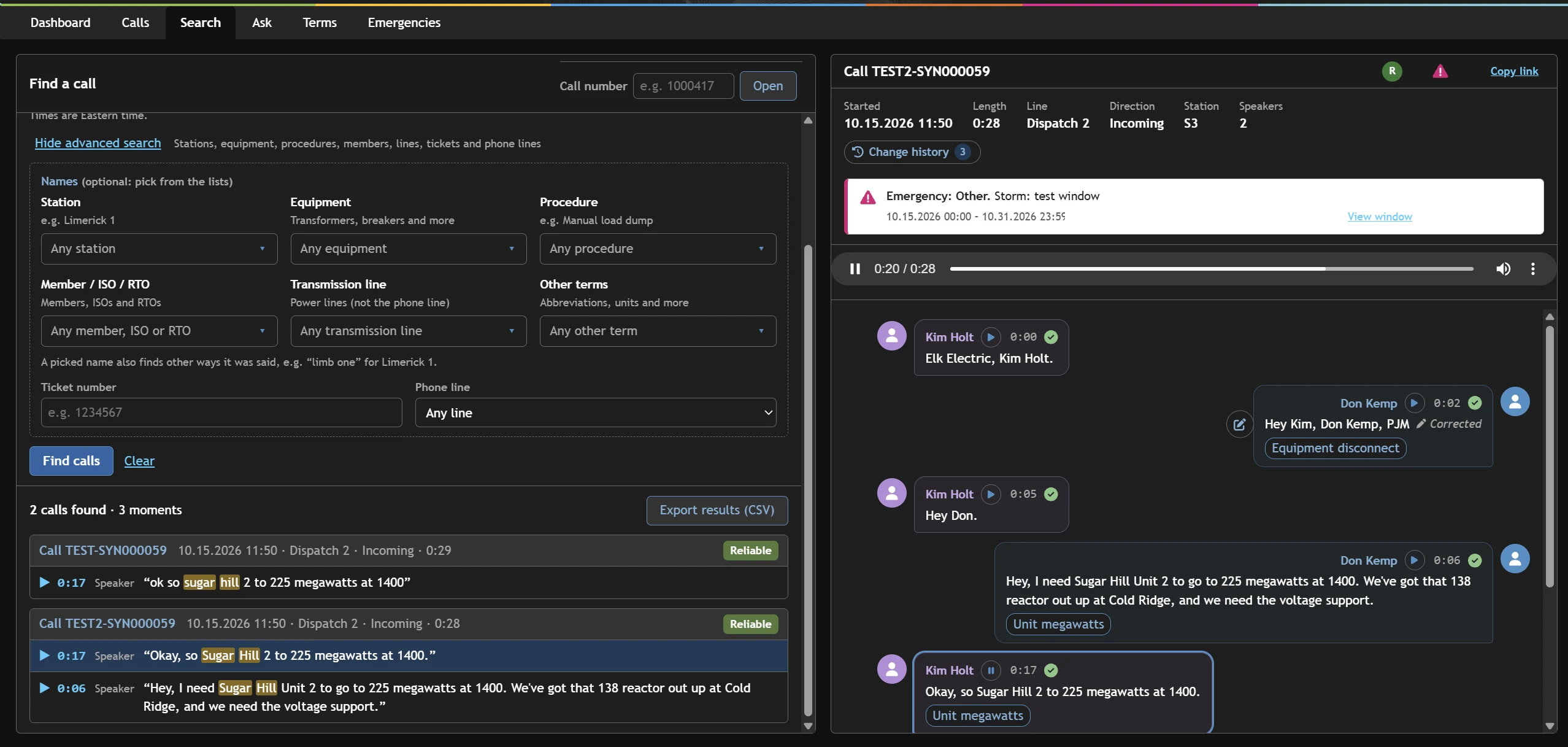
Search · 2 calls found · 3 moments
Searching calls for 'Sugar Hill' shows two matching calls, with the transcript open at the moment it was said
Transcribe
within minutes of the call
Who spoke when
on every line of every call
Any moment
played from the exact second
Per call
Legal Hold and retention

The problem

Recorded isn't the same as findable.

Balancing Authorities, Reliability Coordinators, Transmission and Generator Operators, Distribution Providers, ISOs and RTOs record every control-room call. Finding a specific call, or what was said in it, still means listening through recordings by hand.

That is slow for everyone and costly for teams like Market Settlements, who rely on call content to charge and bill market participants accurately.

Human transcription

People replay recordings and type up what was said, by hand, just to find one instruction or one MW value.

Billing disputes

Settlements need proof of who asked for what, and when.

Audit pressure

NERC asks for dated, timestamped evidence of Operating Instructions.

Legal exposure

Recordings must be preserved untouched when they may become evidence.

NERC communication standards

Helps you meet NERC COM-002-4 and COM-003-1

Dated, timestamped recordings and transcripts as evidence for Operating Instructions issued during an Emergency, with three-part communication checked on every call.

How it helps

How it works

From recording to the right moment

It works with the call recording system you already have. Nothing changes for your operators.

  1. Step 1

    Recorded

    Your existing call recording system keeps capturing every control-room line.

  2. Step 2

    Transcribed

    Each recording becomes a timestamped transcript, checked for quality and confidence.

  3. Step 3

    Who spoke when

    Speakers are separated and labeled, so every line is attributed to the person who said it.

  4. Step 4

    Found and played

    Search by what was said, when, and on which line, then play the recording from that exact moment.

Integration

Linked to your outage ticketing system

When a call discusses taking an outage, the call is linked to the matching ticket in your external outage ticketing system. The conversation behind every outage is one click away, and you can search calls by ticket number.

Features

Built for the way control rooms work

Transcript & playback

Read along, then play from that point

Every call opens as a conversation, not a waveform. Each line is attributed to a speaker, stamped with its time and playable on its own.

  • Speaker-labeled lines with a play button on each one
  • Confidence check on every line, so reviewers know what to verify
  • Corrections tracked in a full change history
  • Equipment, units, acronyms and members tagged as they are said
Call · Dispatch 3 · Outgoing
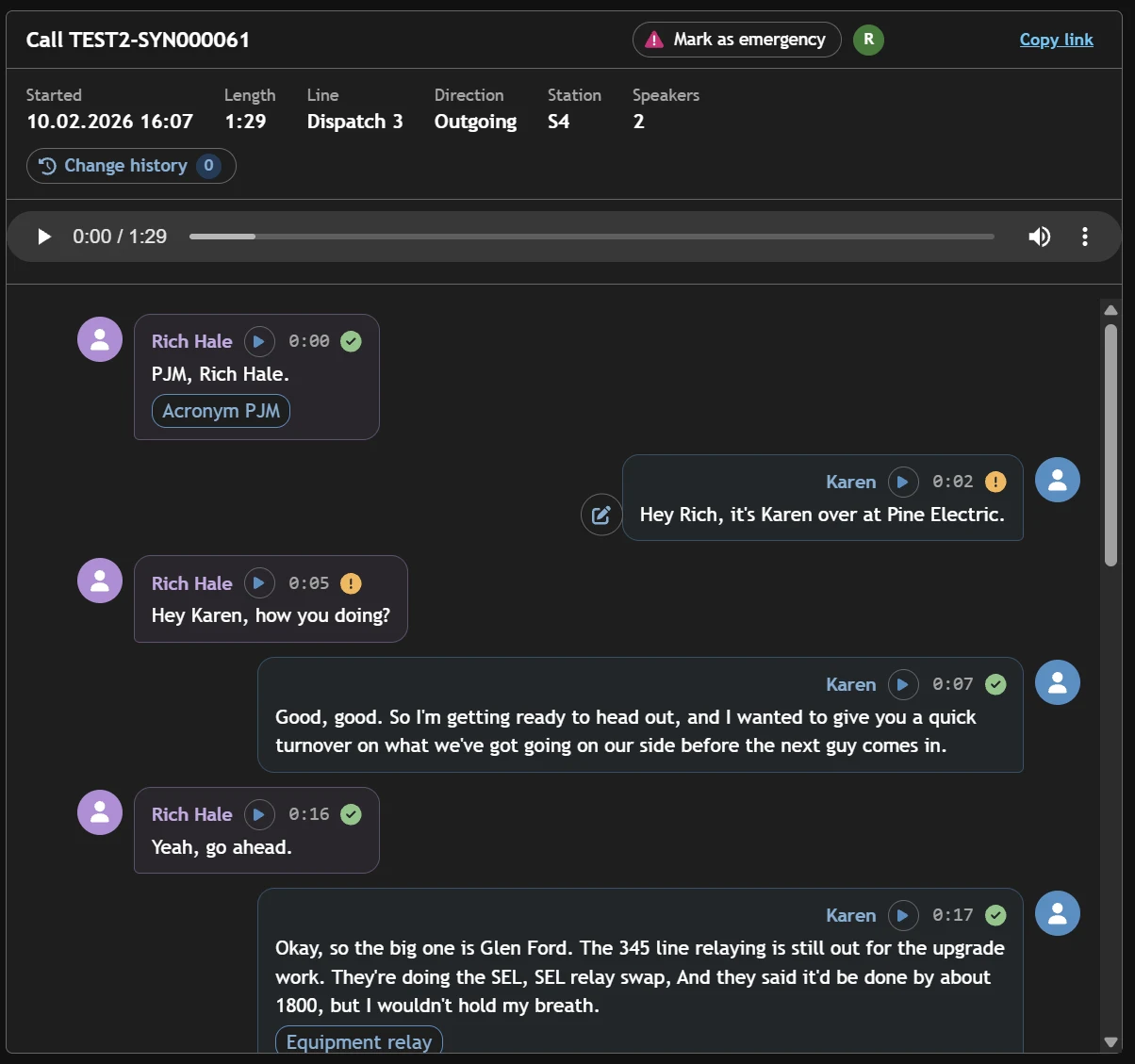
A call transcript with two speakers, timestamps, play buttons and tagged terms

Ask

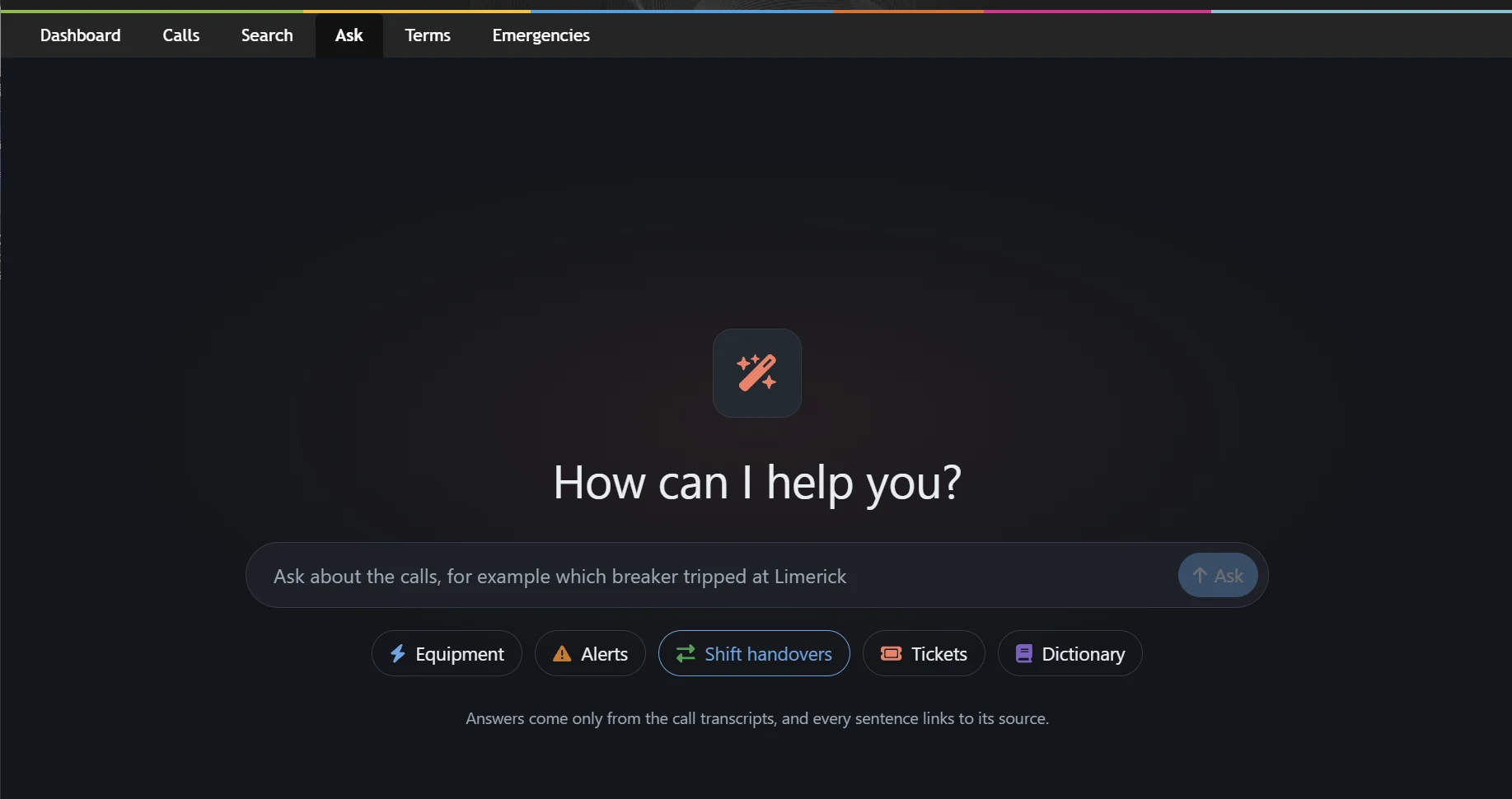
Ask a question, get an answer with sources

Ask in plain English, such as which breaker tripped at a station or what was handed over at shift change. Answers come only from the call transcripts, and every sentence links back to the call it came from.

  • Shortcuts for equipment, alerts, shift handovers, tickets and terms
  • Every sentence cites its source call and moment
  • No answers from outside your own recordings
Ask
The Ask page with a question box and shortcut buttons for equipment, alerts, shift handovers, tickets and dictionary

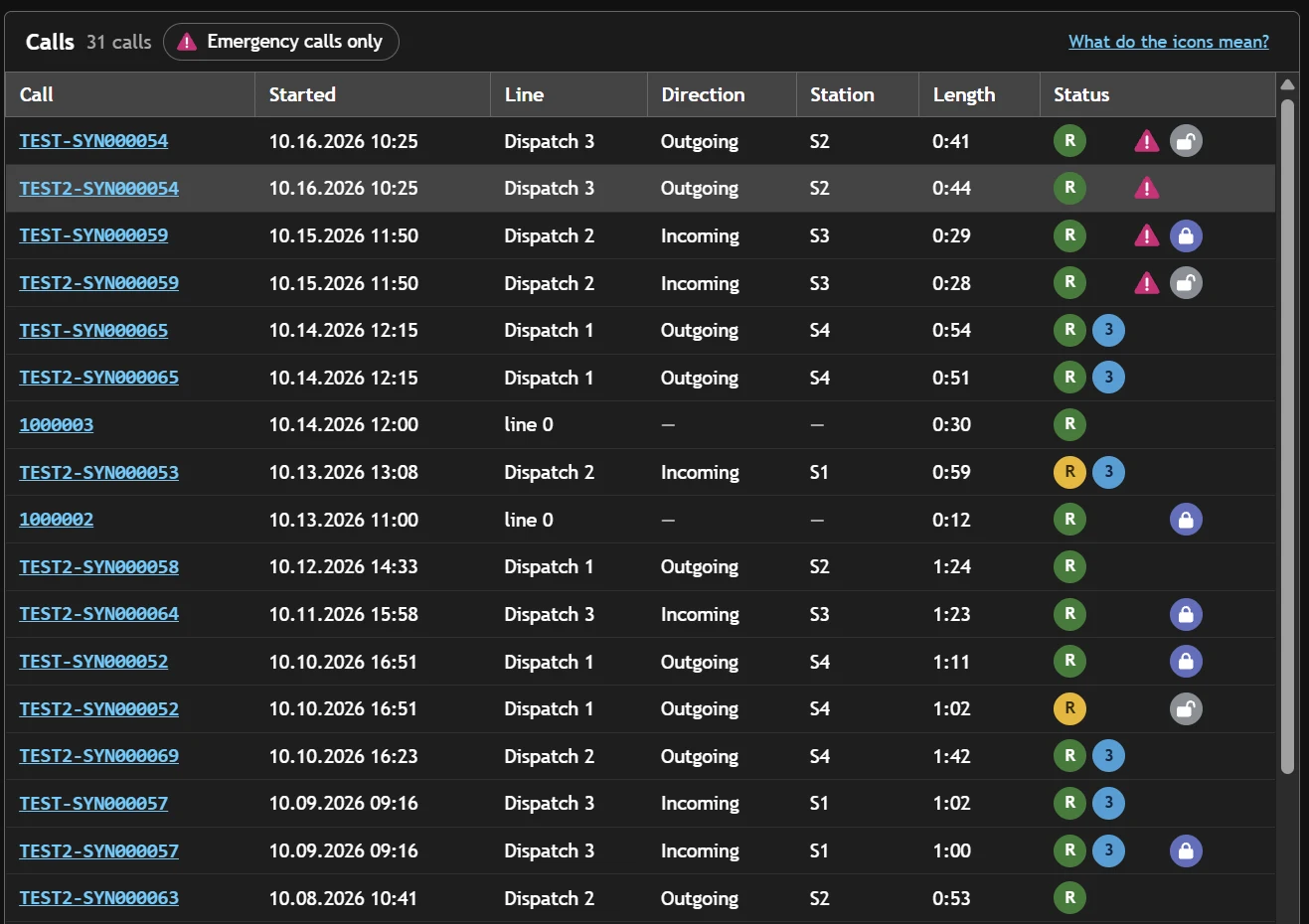
Call log

Every call, its status at a glance

See each call with its line, direction, station and length, plus icons that show whether the transcript is clear, whether three-part communication was used, whether it fell in an emergency, and whether it is under Legal Hold.

  • Filter to emergency calls in one click
  • Three-part communication detected automatically
  • Legal Hold and hold-released status on each call
Calls
A list of calls with line, direction, station, length and status icons
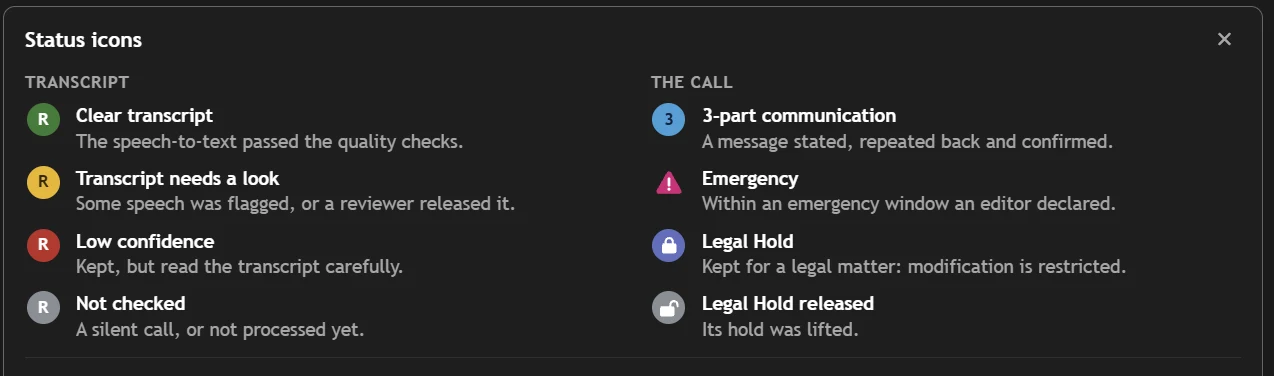
What the icons mean
Status icon legend: clear transcript, needs a look, low confidence, not checked, three-part communication, emergency, Legal Hold, Legal Hold released

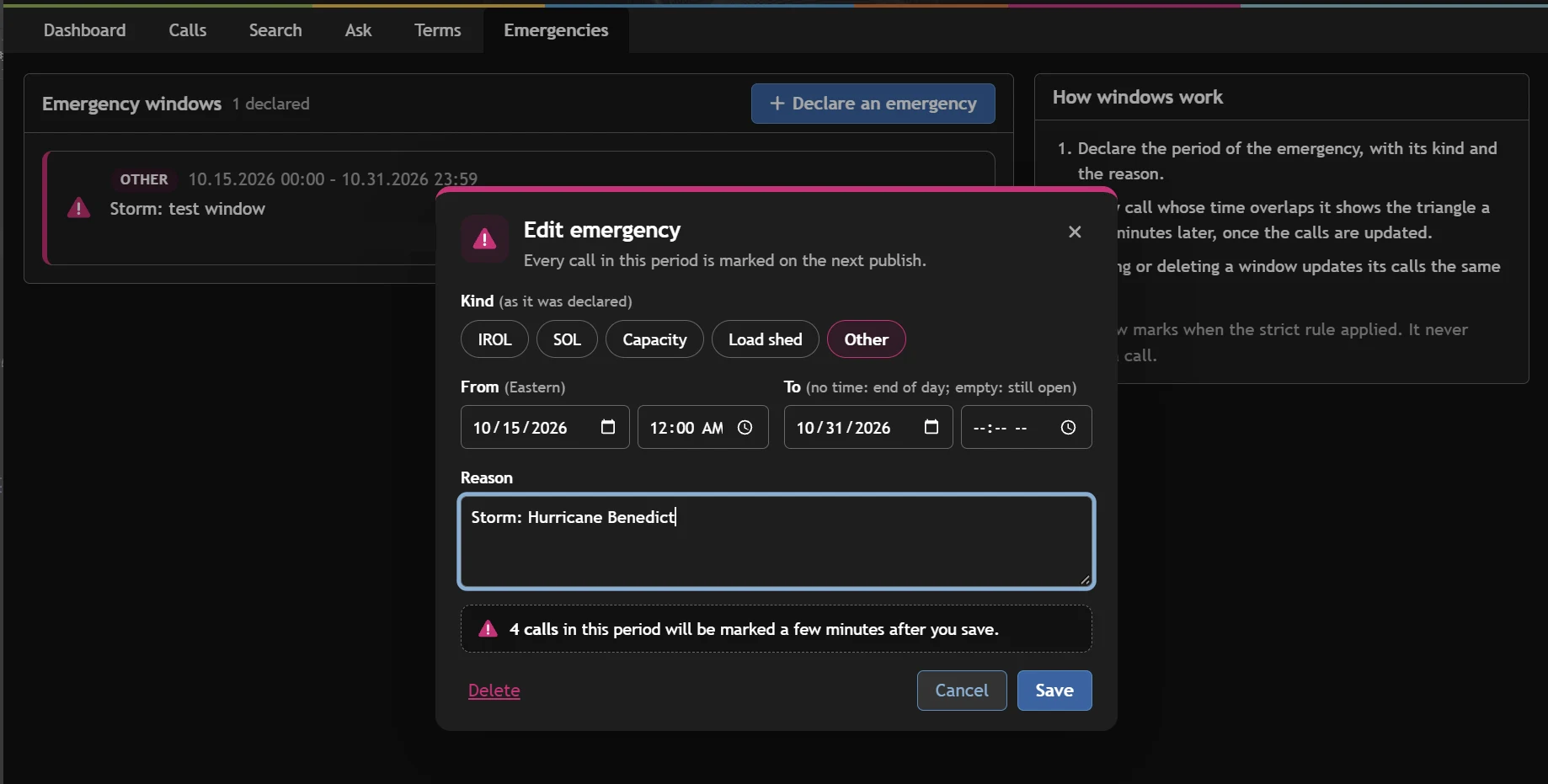
Emergency windows

Declare the emergency once; every call in it is marked

Declare an IROL, SOL, capacity, load-shed or other emergency for a period. Every call that overlaps it is flagged, so the calls you must show under NERC COM-002-4 are already gathered.

  • Kind, start, end and reason recorded with each window
  • Calls are re-marked automatically when a window changes
  • Open-ended windows for events still in progress
Emergencies
Editing an emergency window with its kind, dates and reason

Terms dictionary

Teach it how your control room talks

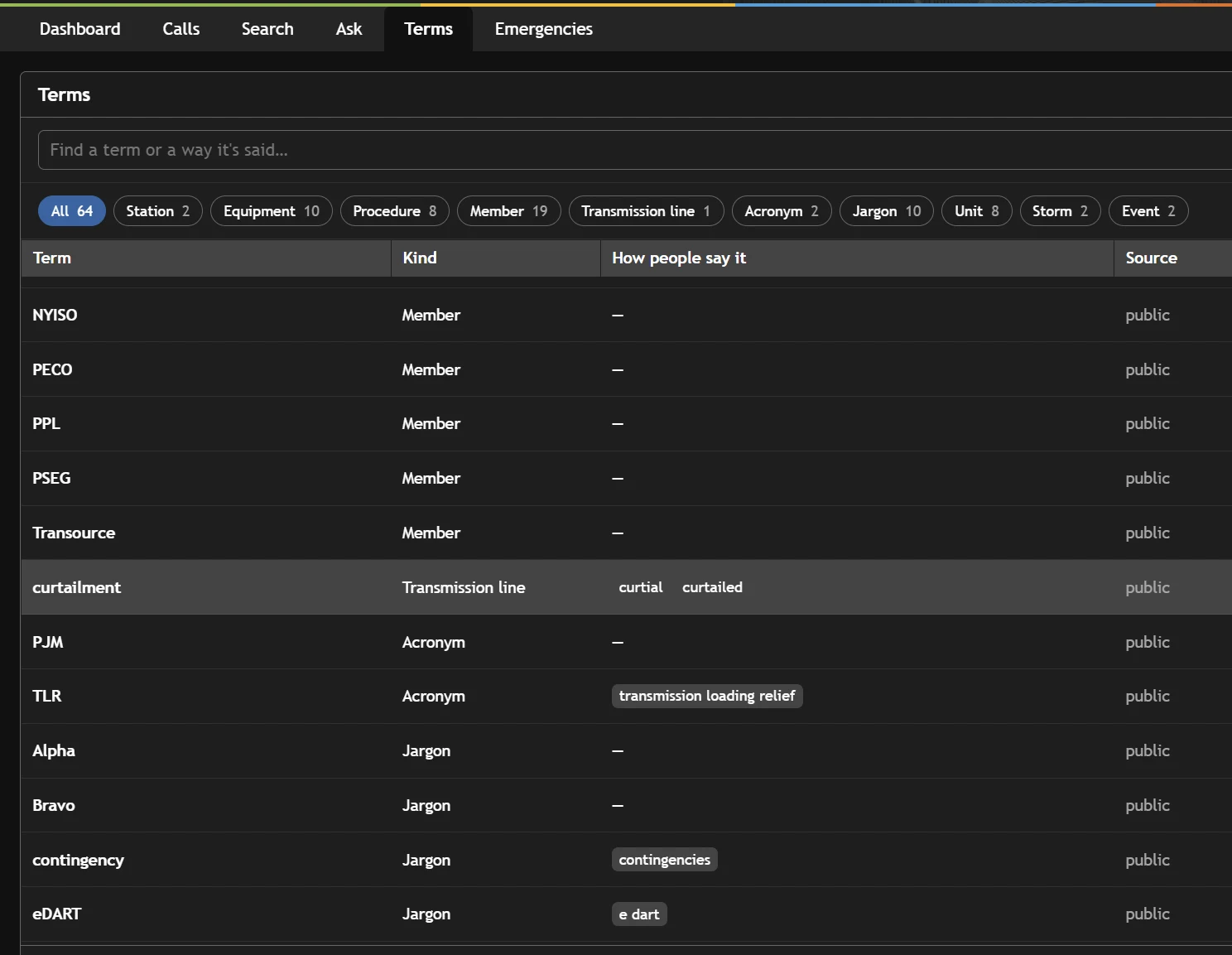
Add your stations, equipment, procedures, members, ISOs and RTOs, transmission lines, acronyms and jargon, along with the ways people actually say them. Transcripts and search both get better.

  • A picked name also finds the other ways it was said, such as "limb one" for Limerick 1
  • Units, storms, events and more, grouped by kind
  • Shared across every user and every call
Terms
The terms dictionary listing members, acronyms and jargon with how people say them

Dashboard

Operations at a glance

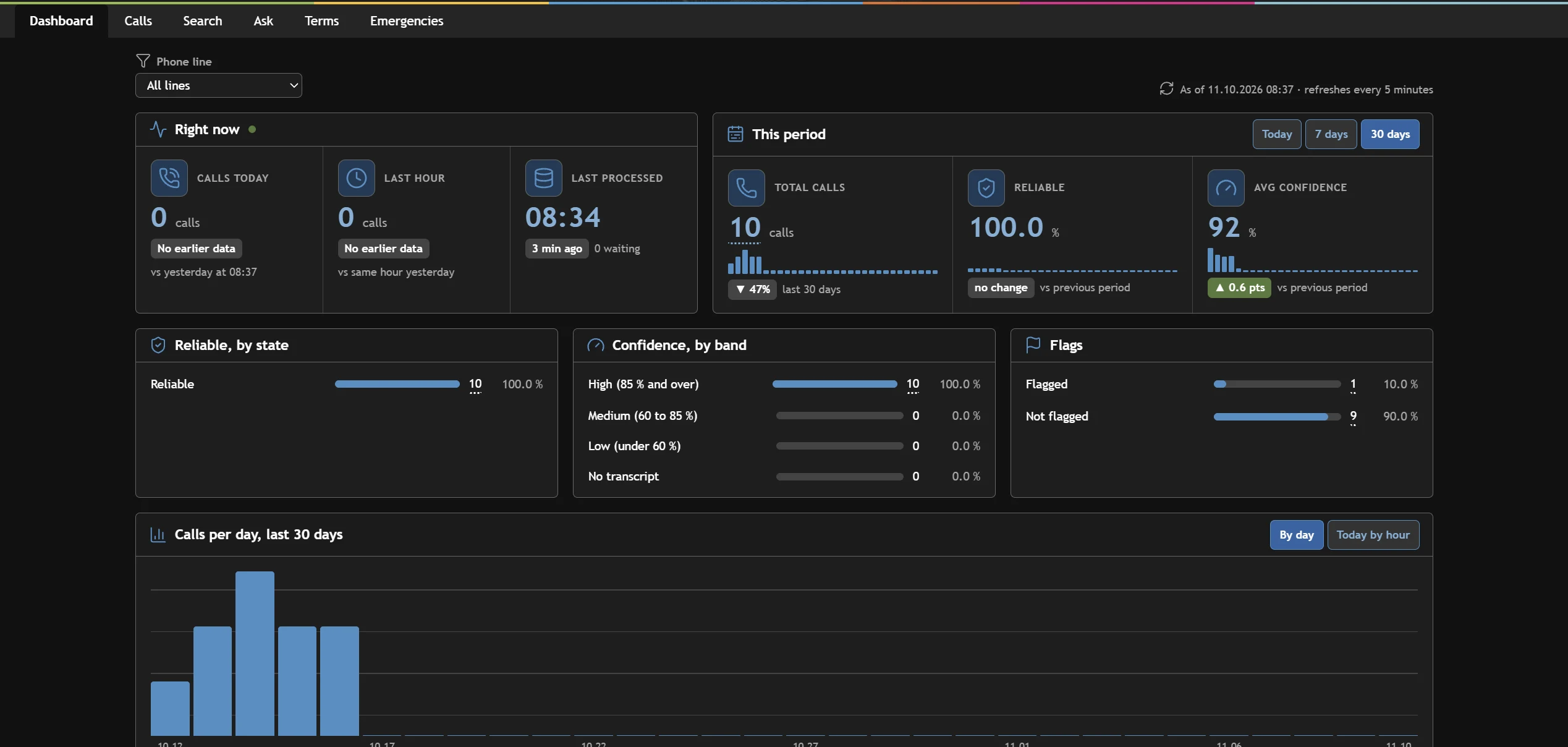
Calls today and in the last hour, transcript reliability and confidence, flagged calls and daily volume, per phone line or across all of them.

Dashboard
Dashboard showing calls today, reliability, average confidence, flags and calls per day

Who benefits

One system, value across the organization

The same searchable record pays off in the control room, in compliance, in legal and in the back office.

Dispatch

Control room

  • Check and report that NERC COM-003-1 three-part communication is being followed
  • Calls that discuss taking an outage are linked to the ticket in your outage ticketing system
  • Shift leads review and evaluate calls and use them as training moments
  • Call audio and metadata kept to your company retention policy
  • Calls that miss three-part communication are flagged
  • Timestamped recordings and transcripts as evidence that Operating Instructions were issued and confirmed

Market Settlements

Billing accuracy

  • Find the call behind a charge in seconds rather than hours
  • Settle questions such as which party requested a curtailment
  • Charge and bill market participants from what was actually said

Transmission Services

Interchange checkout

  • Audit checkout calls between neighboring Balancing Authorities
  • Confirm both sides agreed on the exact MW value, path and timing for net scheduled interchange across tie lines

Legal

Legal Hold, per call

Place a Legal Hold on an individual call recording when it may be needed for litigation, a regulatory investigation or another legal proceeding. The hold preserves the recording and all its data, and blocks any change or deletion until an authorized administrator removes it.

When a hold applies

Fatal or serious workplace accidentsTransmission switching disputesOperator error investigationsFERC, NERC and OSHA investigationsCivil or criminal litigationDiscovery requestsAny event where a recording may become evidence

NERC compliance

Evidence ready when the auditor asks

NERC COM-002-4 accepts dated, timestamped voice recordings and transcripts as evidence for Operating Instructions issued during an Emergency. Dispatch Call Analytics keeps both, marks the calls that fall in each emergency window, and shows where three-part communication (COM-003-1) was followed.

Three-part communication detected and badged on each call
Emergency windows mark every overlapping call
Dated, timestamped recordings and transcripts
Kept to your company retention policy
M5

COM-002-4 · Issuers · RC, TOP, BA

For two-party Operating Instructions issued during an Emergency, show that the issuer confirmed the repeat-back was correct, reissued the instruction, or took another action.

M6

COM-002-4 · Recipients · BA, DP, GOP, TOP

Show that the recipient repeated the instruction and received confirmation, or asked for it to be reissued.

M7

COM-002-4 · Burst instructions · BA, RC, TOP

For single- or multiple-party burst instructions during an Emergency, show that at least one receiver got it.

Summaries of the COM-002-4 measures for orientation only; refer to the NERC standard for the exact requirements. Dispatch Call Analytics supplies evidence and does not replace your compliance program.

Built for

Every NERC functional entity with a control room

Many organizations hold several of these registrations at once. Dispatch Call Analytics serves all of them from one record.

BA

Balancing Authority

Real-time balance of generation and load, and interchange checkouts.

RC

Reliability Coordinator

Wide-area reliability oversight and emergency coordination.

TOP

Transmission Operator

Operates the high-voltage transmission grid.

GOP

Generator Operator

Operates generating facilities and receives dispatch instructions.

DP

Distribution Provider

Operates the distribution system that serves customers.

ISO / RTO

Market operators

Run organized wholesale markets, dispatch and settlements.

Platform

Built on Databricks

Dispatch Call Analytics is built on Databricks, with call recordings, transcripts and metadata stored according to your company's retention policy.

Built on Databricks

Hear it for yourself.

See Dispatch Call Analytics search, transcribe and play back control-room calls in a live demo.

Request a demo

Request a demo

See Dispatch Call Analytics in action

Tell us a little about your organization and we'll follow up within one business day.