
Trust your study data from the first transfer to database lock
Most study data now arrives from outside the EDC. KSM's Clinical Data Repository brings every source into one place, shows what changed in each transfer, and gives your SCE one copy to read in place.
Built on
Most of your study data never passes through the EDC
Central labs, IRT, eCOA and other vendors each send data in their own format, and many studies run more than one EDC across in-house and CRO work. At the SCDM conference in September 2026, speakers put the share of study data outside the EDC at about 70% and named vendor data the leading cause of end-of-study delay.
Many sources, many formats
Reconciliation has to span every EDC, lab and vendor, each with its own file layout and its own visit numbering.
Data that keeps changing
Sites correct entries and vendors resend files for the whole study. It is hard to see what changed between one transfer and the next.
Review evidence built by hand
Review plans hold hundreds of checks. Proving each one ran is manual work, and what slips through surfaces in statistics or as a wave of site queries right before lock.
A copy at every hand-off
Each hand-off to an SCE or a CRO creates another copy to move, validate and keep in sync. It also makes it harder to show who changed what.
One copy of the study, from vendor file to SCE
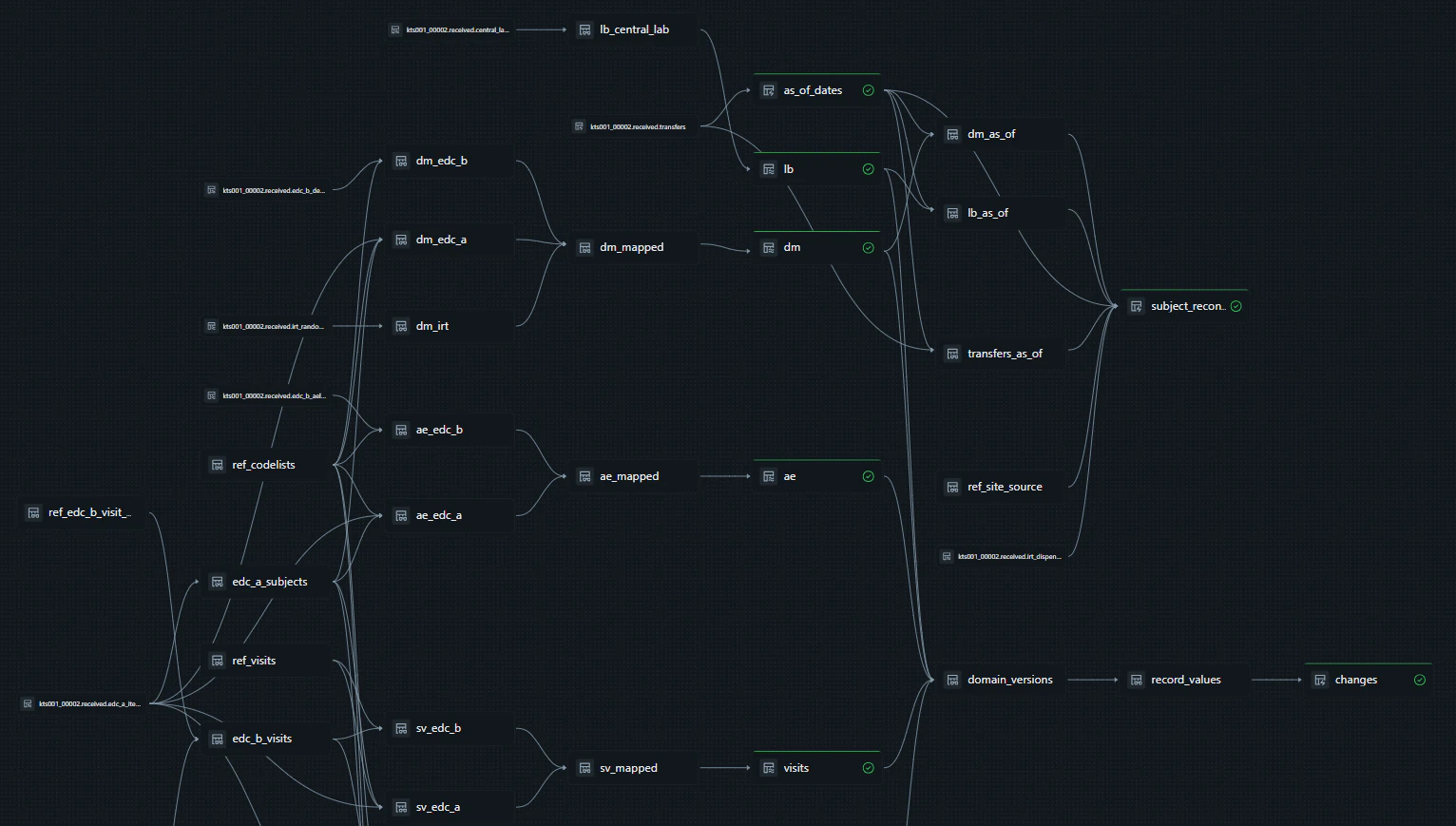
Each study gets its own catalog on Databricks. A transfer moves through four stages inside it, starting when the files land.
- EDCODM-XML
- Second EDC or CROVendor CSV
- Central labCDISC LAB model
- IRTRandomization and kits
- 01
Received
The pipeline starts when files land, with no schedule and no button. Each file is kept exactly as the source sent it and tagged with its transfer.
- 02
Unified
Every source maps to one model with columns named by CDASH, so a check is written once and runs against all of them. Subjects are matched to IRT enrollment, and fields the model has no column for stay on the record.
- 03
Checked
Review plan and transfer agreement checks run as SQL rules on every transfer. What they raise is recorded as discrepancies, each with the dates it opened and closed.
- 04
Read in place
Your SCE reads the collected data with read-only access, live or pinned to a released data cut. Nothing is exported or copied.
Every version of every value is kept, with the transfer that brought it and the transfer that replaced it.
- Your SCER, SAS or Python over ODBC
- Data managersThe study dashboard
- Auditors and QAFrom a data cut to its code and files
The questions it answers
The screens below come from our demo study: test data generated from the public CDISC pilot study (306 subjects, 17 sites) and delivered as transfers from two EDCs, a central lab and IRT.
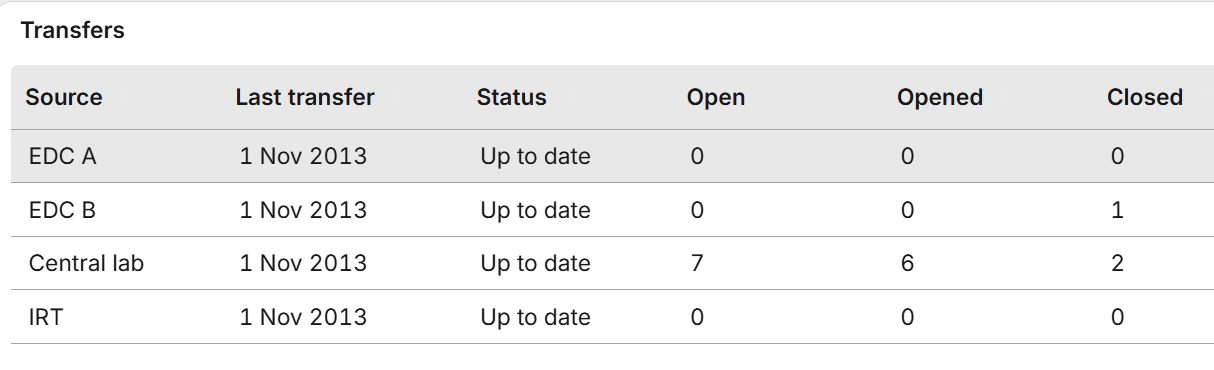
Has every source delivered, and what is open?
The study dashboard is the data manager's morning view. It lists each expected source with its last transfer and counts the discrepancies opened and closed since.
- In the demo, the first transfers raise a randomized, dosed subject that one EDC never sent
- Open discrepancies by check, source and site show where to focus
- A standard Databricks AI/BI dashboard, with no custom application code
What changed since the last transfer?
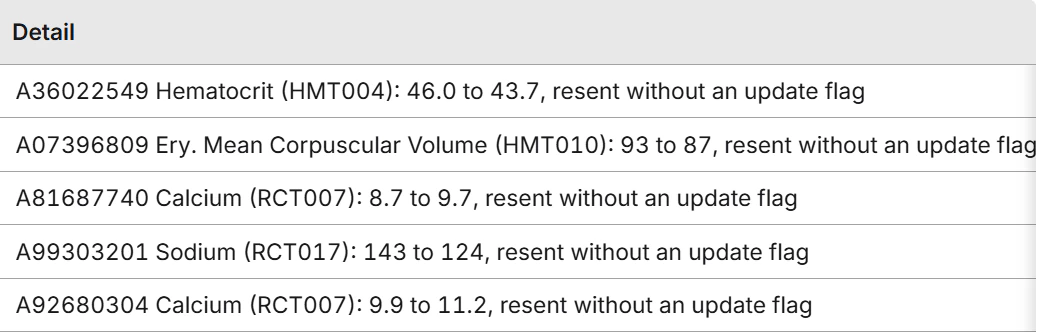
Each transfer is compared with the last one as it loads, and every version of every value is kept. The demo's second transfers bring 23,180 new lab results and 48 changed records, and nobody compares files to find them.
- EDC corrections carry who, when and why from the audit trail
- Five lab values changed with no update flag, and each is raised against the transfer agreement
- Reviewers start with the 48 records that changed
Did the check run, and when did the discrepancy close?
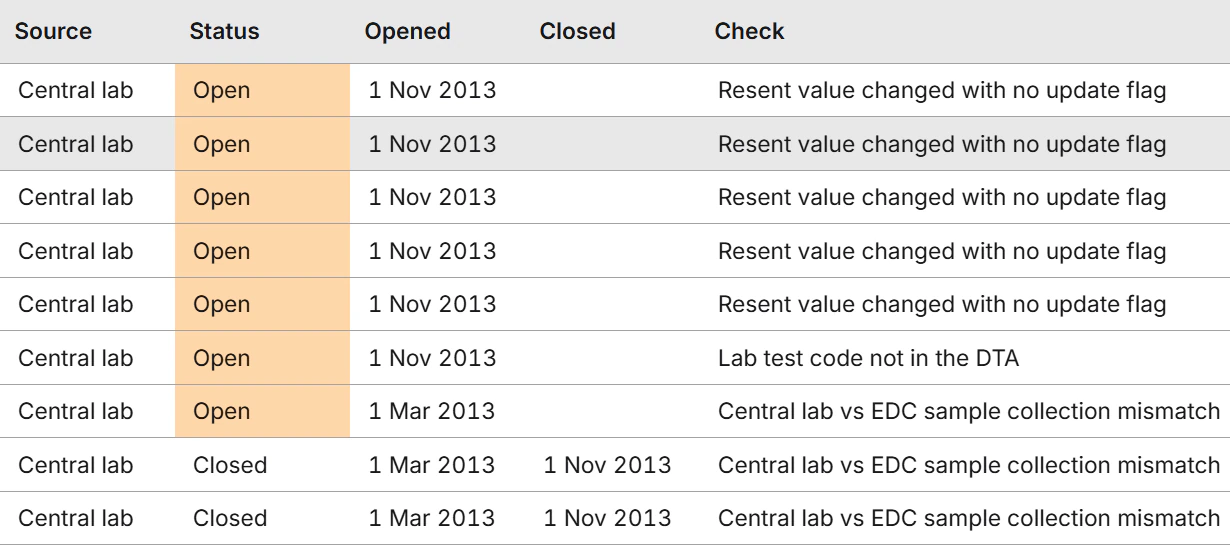
Each check is a SQL rule with its description in plain English, listed by its review plan or transfer agreement ID. What it raises is stored with the date it opened and the date it closed.
- Filter discrepancies by status, source, check and site
- Checks only read the clinical data, and their results live in separate tables
- Your data managers decide which checks each study runs
Which data did this analysis use?
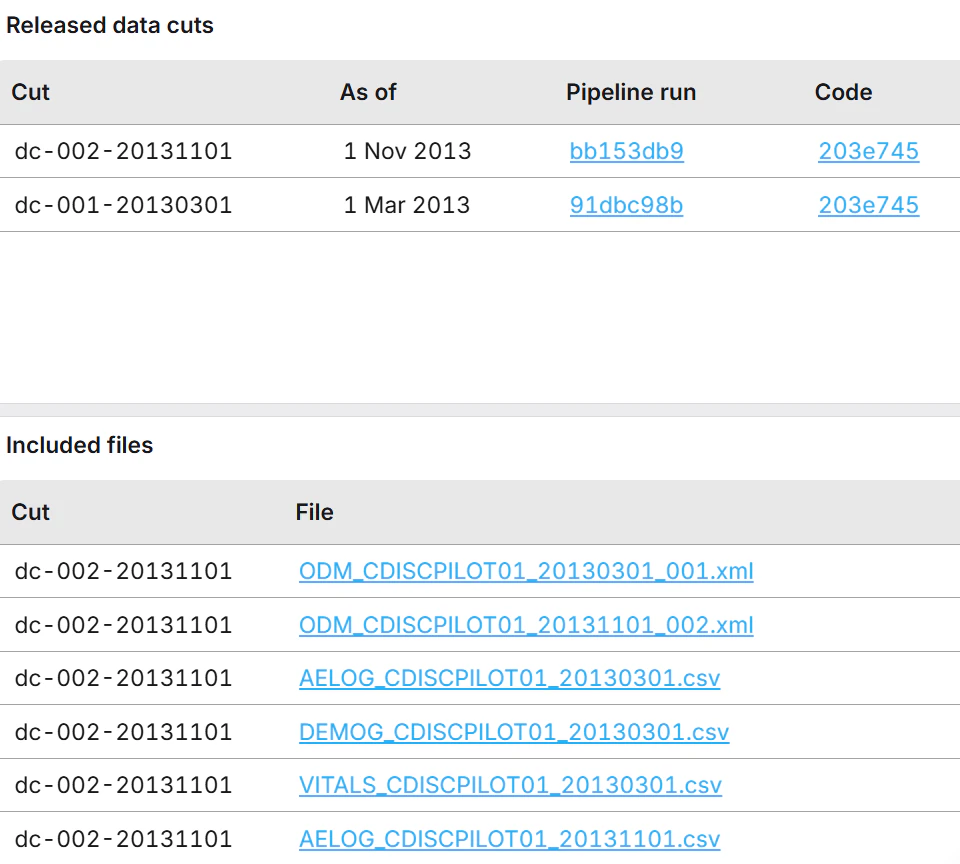
A data cut is a named date on the study's history. Releasing one records who released it, when, the row counts and a fingerprint of each table, and it copies nothing. A program pinned to a cut gets the same numbers next month, whatever has arrived since.
- Each cut links to the pipeline run that produced it and the commit of the code that ran
- Every file in the cut is listed with its transfer and the run that loaded it
- Moving an analysis to a newer cut is a one-line change
Can programming start without another copy?
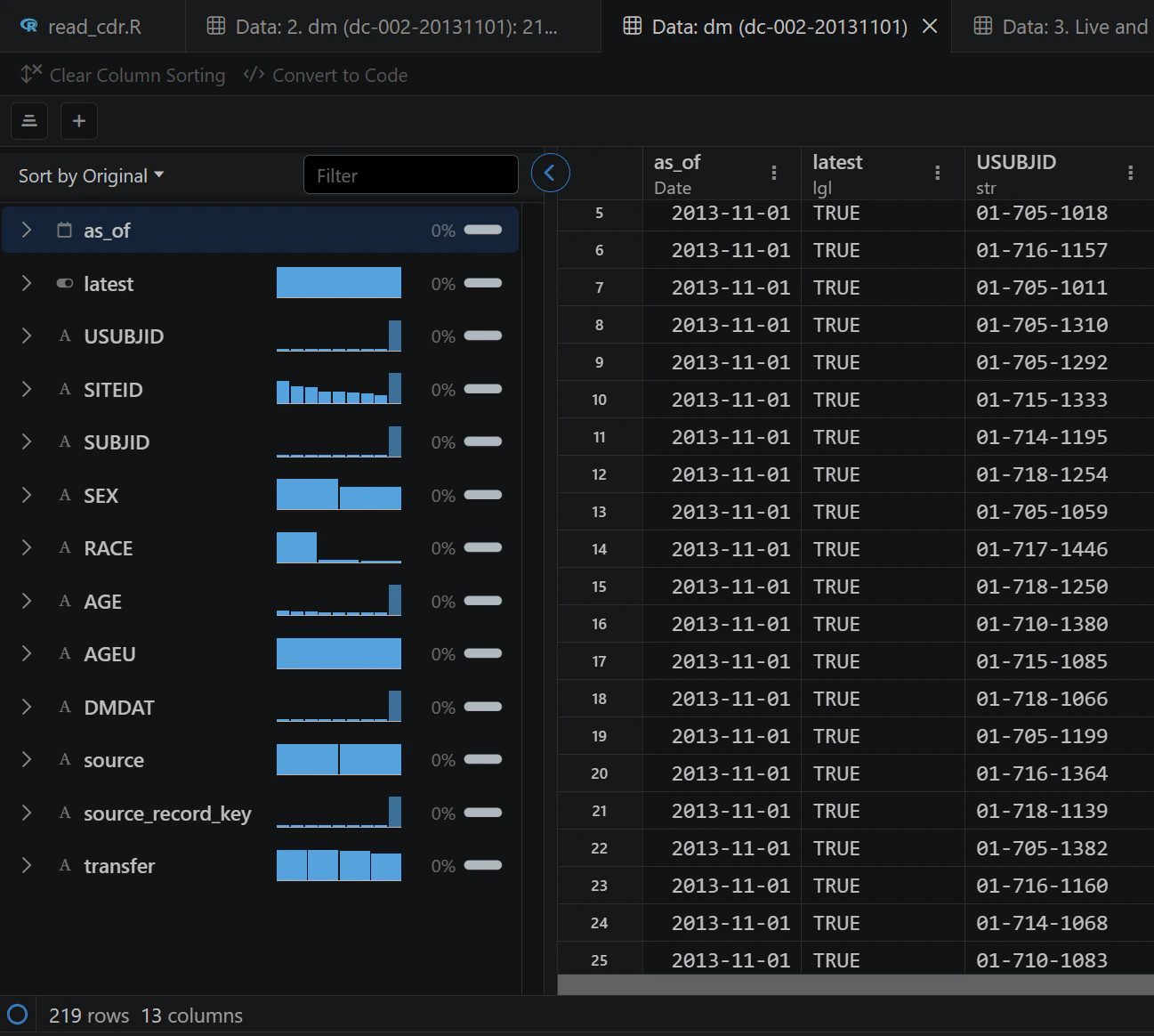
The SCE connects through the Databricks ODBC driver and a SQL warehouse, so R, SAS and Python all read the same tables in place. Its identity can read the collected data and nothing else.
- Column labels travel with the data, the way a SAS dataset carries them
- Treatment arm and kit data stay out of the schema the SCE reads
- Every table names the team that owns it, and the SCE's reads are logged
One copy, useful to every team that touches the data
Clinical data management
Reconcile vendor data the day it arrives and raise a missing subject months before lock. Review time goes to the values that changed.
Statistical programming
Start programming with no extra copy to move or validate. Pin a program to a data cut and rerun it next month for the same numbers.
Quality and inspection readiness
Show an inspector who owned the data at each stage, who released a cut and how it was built. The path from a cut to its code and files needs no request to anyone.
Data strategy and IT
There are fewer hops between systems and one copy to protect. Each study's environment is built from code in a repository, so it can be rebuilt from a commit.
It works alongside the EDC, vendors and SCE you already have
The repository is a data layer. Your EDC, your vendors' systems and your SCE stay where they are. Most of it is built once, and the rest is shaped to each study with your data managers.
- Built once, by KSM
- The platform itself: intake, history, checks, data cuts, the study dashboard and the SCE hand-off.
- Once per source format
- ODM-XML and the CDISC LAB model carry over between studies. A vendor's own CSV layout needs its own ingestion and mapping.
- For each study
- Study configuration and the review plan checks. Your data managers decide what they are, and KSM builds the first study with you.
What sponsors ask first
Does it replace our EDC?
No. It takes what your EDCs and vendors already send and works alongside them. The demo study runs two EDCs with different visit numbering, coding and file formats, and the pipeline is tuned to neither.
Will it work with our vendors' files?
The demo ingests ODM-XML, the CDISC LAB model and vendor-style CSV. A real export will differ in detail, and a format we have not seen means new ingestion and mapping for that feed. Each feed's layout comes from its data transfer agreement.
Is the data SDTM?
No. In CDISC terms it is collected data, named by CDASH, and it is the input to your SDTM programs. Generating SDTM from it is the next phase of our work.
Which SCEs can read it?
Any SCE that runs R, Python or SAS and can use the Databricks ODBC driver. Nothing in the repository changes from one SCE to another.
Is it validated?
Not formally. Every environment is built from a commit, and every change is logged with the commit it ran from. That gives validation a starting point.